What Makes a Good Drawing App? It's More Than Just a Feature List
What Makes a Good Drawing App? It's More Than Just a Feature List.
In today's digital landscape, the market is flooded with drawing apps, each promising to unleash your inner artist. From hyper-realistic brushes to intricate layer management, the competition for features is fierce. But if you're a serious artist, a beginner, or especially a traditional artist looking to bridge into the digital realm, a critical question arises: What truly makes a good drawing app?
Is it the sheer number of brushes? The most advanced filters? Or is there something deeper, something foundational, that defines an app's true value?
Let's explore the common perceptions and then uncover a philosophy that might just redefine your expectations.
The "Feature War" Mentality: Quantity Over Quality?
For many, a "good" drawing app is synonymous with a "feature-rich" app. We're often drawn to:
- Vast Brush Libraries: Apps boasting thousands of brushes, from charcoal and watercolor to exotic textures and patterns.
- Advanced Layer Systems: Complex blending modes, masks, and organization tools for intricate compositions.
- Powerful Editing Tools: Filters, liquify, perspective grids, and selection tools that speed up the workflow.
- Realistic Simulations: Digital brushes that attempt to mimic the behavior of real paint on a canvas.
While these features are undoubtedly powerful for professional digital artists, they can also present significant drawbacks, particularly for those focused on learning or transferring traditional skills:
- Overwhelm & Confusion: A beginner can drown in options, spending more time scrolling through menus than actually drawing.
- Reliance on Digital Crutches: It's easy to use a texture brush to simulate depth instead of understanding tonal values, or to rely on blending tools rather than mastering hand-blending techniques. This can lead to art that feels "plastic" or lacks an authentic, hand-rendered quality.
- A Shift in Focus: The excitement of new tools can inadvertently detract from the timeless pursuit of mastering foundational art principles.
The Traditional Artist's Dilemma: Finding Authenticity in Digital
Many traditional artists, steeped in the discipline of observation, manual control, and understanding core elements like value and form, feel a disconnect. They fear that moving to digital will somehow compromise their hard-earned skills, making their art feel less "real" or less "organic." They seek a digital canvas that respects their existing knowledge, rather than forcing them to relearn everything through a new set of digital shortcuts.
They understand that true artistry isn't about the tool itself, but about the artist's ability to see, visualize, and execute.
The Paintology Philosophy: Mastering Fundamentals with Purposeful Simplicity
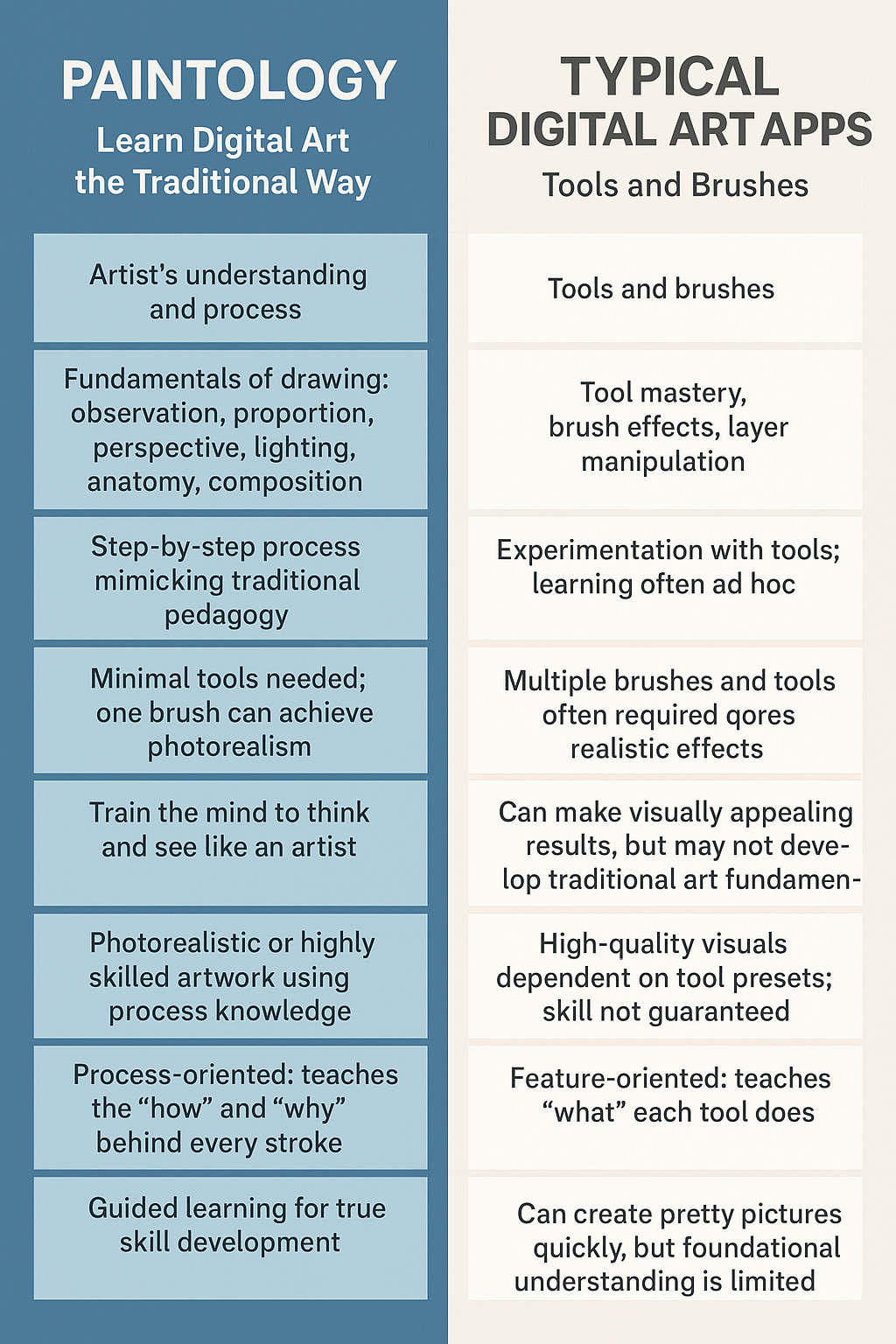
This is where an app like Paintology offers a refreshing and profoundly effective alternative. Paintology's philosophy radically redefines "what makes a good drawing app" by prioritizing skill development and fundamental mastery over an ever-expanding feature list.
Instead of an arsenal of specialized tools, Paintology champions the power of focused simplicity. By deliberately guiding artists to work primarily with one versatile brush (allowing for variations in opacity and pressure), it achieves something remarkable:
- True Skill Building: Artists are compelled to master the foundational elements of drawing—tonal values, form, light and shadow, composition, and authentic stroke control. These are the same skills that underpin all great traditional art.
- Organic, Human-Centric Results: Because the artist isn't relying on automated filters or complex digital blenders, the resulting artwork has an inherent "organic" feel. Every blend, every texture, is a direct result of the artist's nuanced hand movements and understanding, making the digital creation feel genuinely hand-rendered.
- Unbiased by Tools, Biased Towards Skill: Paintology creates an environment where the quality of the artwork is a testament to the artist's internalized understanding and dexterity, not the software's features. It allows traditional techniques to flourish and expand into the digital medium seamlessly.
- A Pedagogical Requirement: For artists committed to building genuine skill, Paintology addresses a critical pedagogical need. It provides a structured, guided path (with hundreds of tutorials) that respects and leverages a traditional art education, ensuring that the digital canvas becomes an extension of the artist's hand, capable of producing work that is truly their own.
Redefining "Good": A Focus on the Artist, Not Just the App
So, what truly makes a good drawing app?
Perhaps it's not the one with the most bells and whistles. Perhaps it's the one that empowers the artist to develop their skill, their vision, and their unique voice, without overwhelming them with unnecessary complexity. It's the app that helps the artist understand that while tools may change, the timeless principles of art remain supreme.
For traditional artists seeking an authentic digital transition, and for anyone serious about building foundational art skills that truly resonate, a good drawing app might just be the one that puts artistry and human skill firmly back at the center.